Updated 30 September 2026 · Development alpha
Upgrade from your panel.
Configure private repository access once on the VM. Then review and approve compatible releases from Updates as the installation owner.
Already installed? Start here. Do not rerun the fresh installer or use git pull in the exported /opt/nodara tree. Every upgrade needs your explicit approval. Game worlds need separate backups.
Choose the right setup path
The first updater supports one Linux VM with /opt/nodara, SQLite, Python 3.13, systemd, one worker, a loopback Docker agent and a healthy repair baseline. It preserves Nginx, Apache or Caddy configuration, including recorded custom HTTPS ports and public/private endpoints.
| Your installation | What to do |
|---|---|
| Fresh Debian 13 installation from updater-capable source | The installer includes the maintenance helper. Continue with repository access below. |
| Existing exported single-VM pilot with a validated baseline | Use the reviewed one-time commissioning procedure below, then configure access. |
| Manually commissioned updater source, helper not installed | Use the separate bootstrap step below only after baseline validation. |
| Remote agent, remote database, no baseline or another layout | The first updater cannot adopt this setup. Use the manual upgrade procedure; never fabricate a baseline. |
Existing single-VM commissioning and bootstrap commands
For a supported pre-updater exported installation, obtain the reviewed updater-capable Git revision through your private repository access. Run from that clean, root-owned checkout using the installation’s existing Python. The commissioning utility verifies the old baseline and unchanged dependency lock, backs up state, stops Nodara services and publishes the new baseline. It already installs the helper.
sudo /opt/nodara/.venv/bin/python -m scripts.commission_updates install
# Only if commissioning was interrupted; use its printed UUID:
sudo /opt/nodara/.venv/bin/python -m scripts.commission_updates recover OPERATION_UUID
Retain /var/lib/nodara-bootstrap/ and the reviewed checkout. This is not an arbitrary-host adoption command. For separately commissioned updater source without a helper, run this instead from /opt/nodara:
cd /opt/nodara
sudo /opt/nodara/.venv/bin/python -m scripts.update_onprem bootstrap
Do not repeat bootstrap after successful commissioning. It refuses to overwrite an existing helper; preserve its diagnostic files if it fails. See the operator reference (private repository access required).
1. Create a token with read-only repository access
- Accept the GitHub invitation supplied after purchase and confirm the private repository opens in that account.
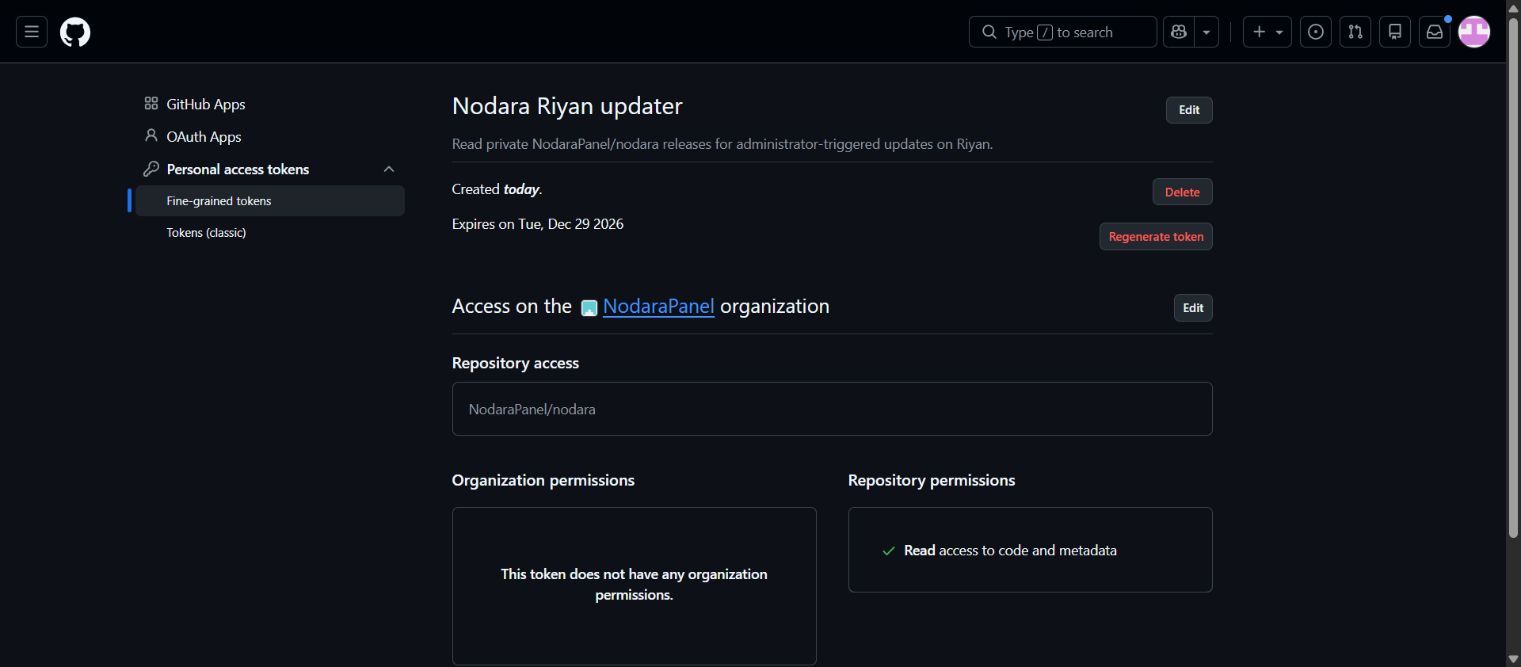
- Open Settings → Developer settings → Personal access tokens → Fine-grained tokens → Generate new token.
- Name it for this VM, choose a finite expiry and select NodaraPanel as the resource owner.
- Select Only select repositories → NodaraPanel/nodara.
- Add Contents: Read-only. Required Metadata: Read-only is included. Leave organization and write permissions unselected.
- Generate the token and complete organization approval if required. Keep the value private for the next step.
If the organization is missing, contact the access provider to check membership and policy. Outside-collaborator access alone does not support this organization-token path. GitHub explains these token limitations and approval rules.
2. Configure access on the VM
Use an independent SSH session or VM console. Enter the token at the hidden prompt; it will not echo. Keep it out of chat, screenshots, shell arguments, Git URLs and the panel.
sudo nodara-update configure
sudo nodara-update status
sudo systemctl status nodara-maintenance
Wait for Repository access configured. and "configured": true in status. The root-only token is stored at /var/lib/nodara-updates/github-token with mode 0600; the panel never receives it. Renew access before expiry using the same configure command with a replacement token.
3. Review and approve a release
- Sign in to your panel’s HTTPS URL with the administrator username/password you chose during setup. There is no universal password; your Linux root password and GitHub token are different credentials.
- Open Updates as the installation owner, then choose Check for updates. Customers and delegated staff cannot upgrade the installation.
- Review the available version, exact source commit and release notes. A release must explicitly support the currently installed revision.
- Let active jobs finish and disconnect all SFTP clients, including idle connections. Queued jobs are retained. Keep separate game and off-host backups.
- Enter your panel password and configured authenticator or recovery code, acknowledge the maintenance interruption and backup scope, then select Install this release.
- Leave the page open while the helper verifies artifacts, stages locked dependencies, drains writes, backs up state, applies migrations and restarts Nodara services. The page reconnects and reads the durable result.
Docker, Tailscale, unrelated services and running game containers are not restarted by the updater. Panel and SFTP access pause during maintenance. Changed release assets require a fresh preview. A lost browser connection is not proof of success.
4. Confirm the installed version and outcome
Confirm the expected version and commit under Installed release, with a complete outcome and backup location. Then verify service health, node connection and your workflows.
sudo nodara-update status
sudo nodara-repair check
sudo systemctl status nodara-panel nodara-worker nodara-agent nodara-maintenance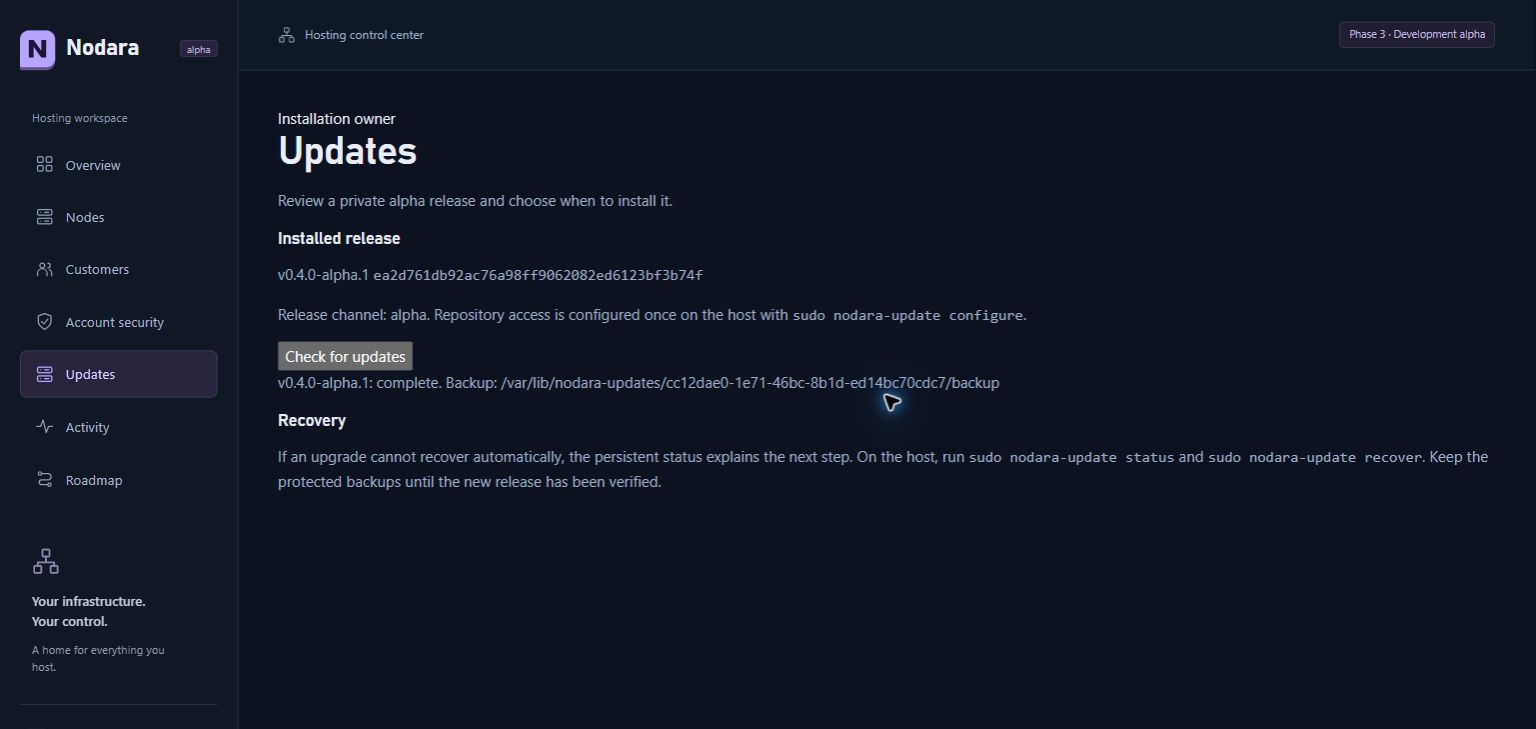
No compatible published release is available. after a successful check is normal when already current or when no release supports your installed revision. It is distinct from an authentication error.
Backup and recovery boundaries
Keep the complete protected operation directory under /var/lib/nodara-updates/, previous runtime and repair baseline. Backups cover panel SQLite/local state, agent state, original source/runtime and static files; protected repair copies preserve environment and proxy configuration. Game worlds, Docker volumes and remote databases are excluded. Keep independent application-consistent backups off the VM too.
sudo nodara-update status
sudo journalctl -u nodara-maintenance -n 100 --no-pager
# Only when status calls for interrupted-upgrade recovery:
sudo nodara-update recover
sudo nodara-repair check
Before the durable commit, controlled failure attempts to restore matching source, runtime, database and baseline. Unknown edits or an uncertain migration boundary block recovery instead of overwriting possible operator changes. After commit, recovery only finishes reopening the installed version; it does not put an older database over new user activity. Preserve evidence and follow the status explanation.
There is no downgrade button, unattended upgrade, fleet rollout or automatic backup pruning. Reserve disk space for retained backups and runtimes. Repair and updates share a maintenance lock; do not delete journals to bypass a block. The protected helper itself needs a separate reviewed operator update.
Troubleshooting
| What you see | What to check |
|---|---|
| GitHub 401 | Expired/revoked token. Replace it using the same narrow scope and hidden configure prompt. |
| GitHub 403 / resource not accessible | Contents read-only, selected repository, organization approval and membership. Metadata access alone cannot read private releases. |
| GitHub 404 | Correct account, accepted invitation and private repository access. |
| Check disabled / helper unavailable | Supported layout, maintenance service and host status. Validated legacy installs need commissioning first. |
| No compatible release | Compare installed commit and release notes. Do not force compatibility by changing the manifest or baseline. |
| Maintenance blocked | Active jobs, idle SFTP connections, unresolved repair/node journals, free disk space and the specific status explanation. |
| Page disconnects | Reconnect and inspect durable status. Use host recovery if required; do not rerun the installer. |
What has been verified
On 30 September 2026, the live Ubuntu 24.04 pilot completed the real private-GitHub release path to v0.4.0-alpha.1, commit ea2d761db92ac76a98ff9062082ed6123bf3b74f. Public/private trusted HTTPS, the completed transaction and repair health passed. Environment/proxy hashes and unrelated service/container identities stayed unchanged. The first release exercises delivery and the transaction without additional application changes beyond the commissioned updater.
The exact-release Linux and four-VM checks also passed: Debian 13 with each HTTPS proxy and Ubuntu 24 legacy commissioning, interrupted-update recovery, migration rollback, runtime switching and reboot. GitHub evidence requires repository access. Those VM workloads are synthetic, not real gameplay or physical power-cut tests. The shared live host was not rebooted and its game remained stopped during this upgrade; workload, SMTP and disaster-recovery acceptance remain open.
Release assets nodara-source.tar.gz and nodara-release.json are updater inputs, not a fresh-installer bundle. New customers start from the reviewed Git checkout. Continue with the first-server walkthrough for the seven setup screenshots.